NeuraTiM TempoLane
See your day, one block at a time.
TempoLane draws today as one lane you can read at a glance: the hours down the side, everything you planned hanging off them at the height its time gives it. No account, no sync, no tracking — the plan stays on your device.
Still being prepared for release — the web build goes live with its first deploy.
How it works
Capture it, place it, run the day
Three things, in the order you actually do them. Nothing here needs a tutorial, and nothing waits on a sign-in.
Capture it in one line
Tap the plus, type what needs doing, and send it to the inbox, to today, to tomorrow, or to a time you pick. Type, length, icon, colour and repetition are all on that one sheet, so a daily routine takes one pass rather than a save and a re-open.
Put it on the lane
The lane is drawn to scale, so where an item sits is what its time says — not where a list would put it. Empty early and late hours fold away until you ask for them, and an all-day item rides above the lane rather than pretending to have a time.
Run the day
A line marks now. The strip of days above lets you step through the week without leaving the screen, the summary keeps count, and the last thing you changed can be undone from the menu.
The screens
Seven screenshots, and what each one is for
Pick a screen. These are photographs of the app running, not drawings of it — one Thursday's plan, captured at 390×844 in the theme the app ships with. What you see is what it does.
Today, at a glance
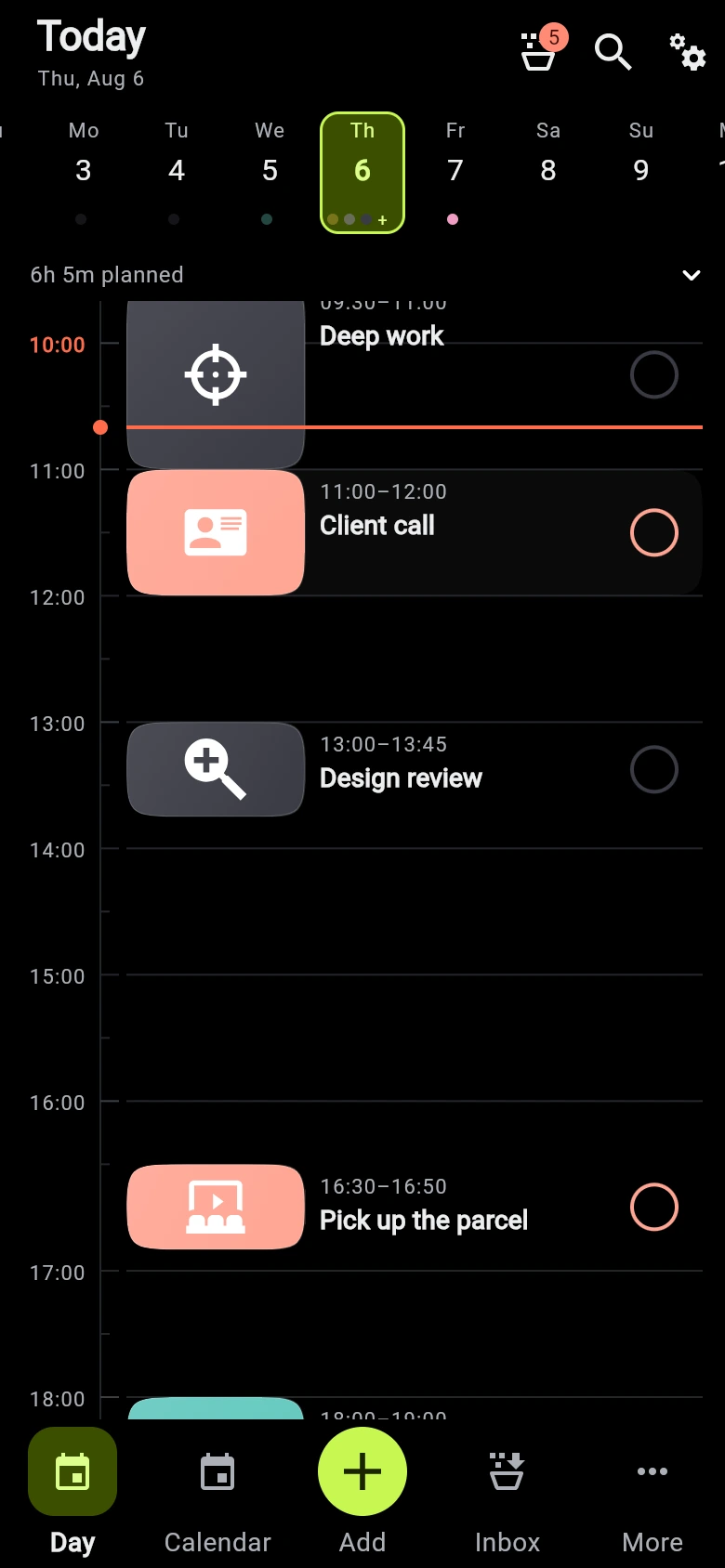
One vertical lane, drawn to scale: 07:00 to 22:00 down the side, eight things hanging off the rail at the height their time gives them, the two already behind us ticked, and a line across 10:40. The badge says five more are waiting for a date.
Captured from a release build with a seeded day and a pinned clock, so the now-line always lands mid-morning. Quick entry and Focus are further up the page; Business mode adds a projects page and a board, and the priority matrix has a screen too.
Three modes
As much app as you asked for
Most planners are one app that is either too thin or too heavy. TempoLane ships three sizes of the same app, and the mode decides how many pages and fields exist at all.
Basic
Today, the month, an inbox — and the pages that make a planner worth keeping: statistics, templates, closing the day, and calendar files. Nothing you have to learn before the first item is on the lane.
Pages, in the order they earn a slot
Advanced
Adds focus sessions, a priority matrix, business-day repeats, and quick entry that reads the time, the length, tags and priority out of the line you typed.
Pages, in the order they earn a slot
Business
Adds projects, clients and a board of work states, so a piece of work carries its own items, its logged time and its rate. For one professional on one device.
Pages, in the order they earn a slot
You choose one during setup and can change it whenever you like. A simpler mode hides fields; it never deletes them, and nothing you have entered is lost either way. The navigation itself is measured rather than fixed: a phone finds room for the first few pages and puts the rest behind More, while a desktop window shows the whole list down a rail — one order, decided once.
What is in it
Everything the day needs, nothing it does not
TempoLane is a planner, not a productivity system. There is no scoring, no streaks and nothing to keep up with — just the day, drawn accurately.
A lane, not a list
A single vertical rail with the hours beside it and minor ticks between them. One hour is always the same distance, so a full morning looks full before you read a title. Items that overlap sit side by side instead of hiding each other.
The day, counted
How much is planned, how much of the day is still free, whether anything clashes, and how much is done. Four figures above the lane, collapsed to one when you want the room back.
Repeats, set at capture time
Every day, every weekday, every week, every month, every year, every business day, or a custom interval — chosen while you capture the item, not two screens later. For a monthly repeat on the 31st you pick what February should do.
Quick entry that shows its work
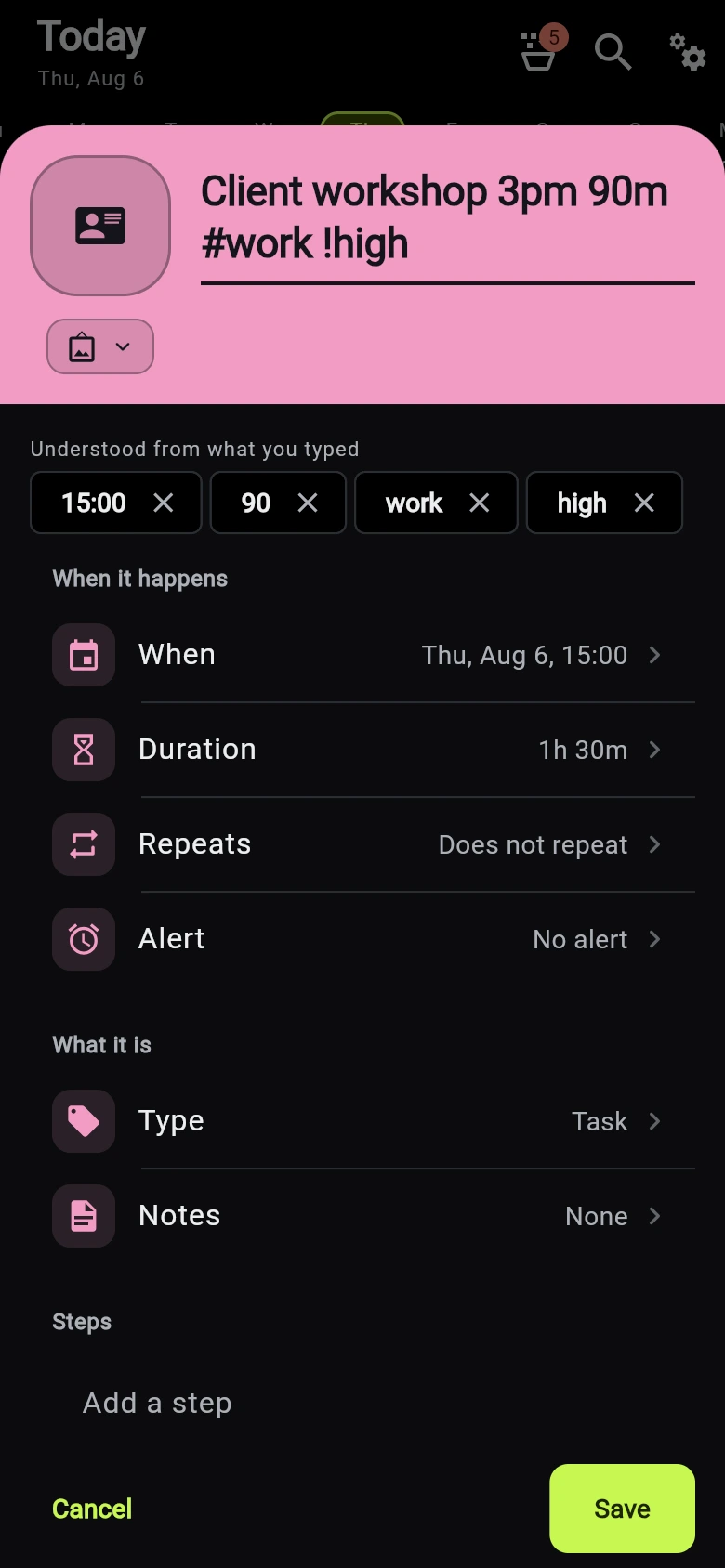
Type “Design review 2pm 45m #work !high” and the sheet shows a chip for each thing it understood: the time, the length, the tag, the priority. Remove any chip you disagree with. Your title is never rewritten behind your back.
An inbox for the undated
Anything captured without a date waits in the inbox with its length attached, ready for the day you decide to give it. Nothing is auto-scheduled.
Month and agenda
A month grid with a bar per item and the neighbouring months dimmed, the selected day's agenda underneath it, and one tap to open that day on the lane.
Focus sessions
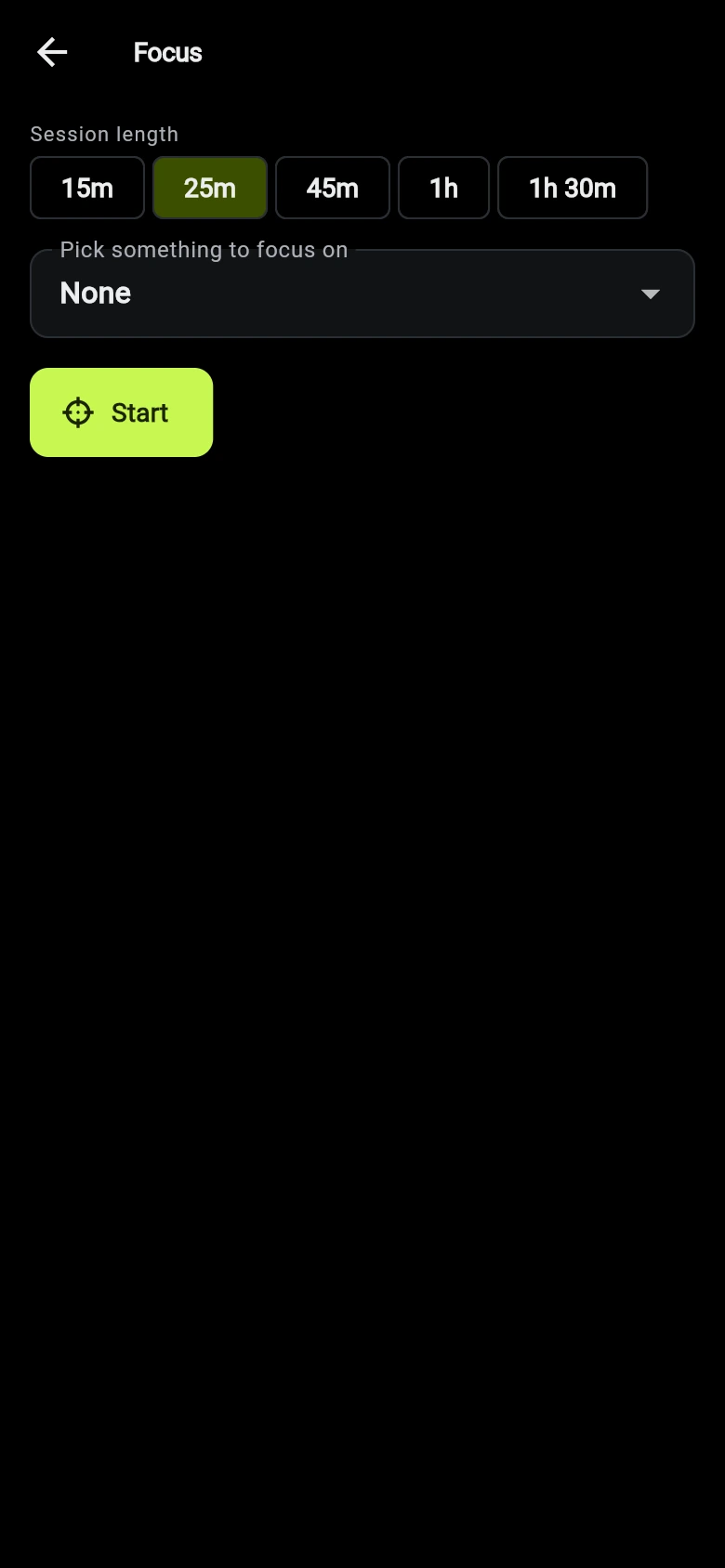
Pick 15m, 25m, 45m, 1h or 1h 30m, pick something to focus on, and the time you actually spend is written back to that item. A session under a minute is not logged at all.
A plan you approve, not one that happens to you
Ask the planner where the loose ends fit and it proposes a whole day before it changes anything — with the reason it chose each slot, and the reason it could not place the rest. Apply it or walk away; it runs on fixed rules, on this device.
Drag to reschedule
Press and hold a block to move it to another hour. It snaps to your interval, scrolls the lane when your finger nears the edge, and lands as one undoable step. Length is changed in the item's own sheet, where the handle cannot fight the tick.
Close the day
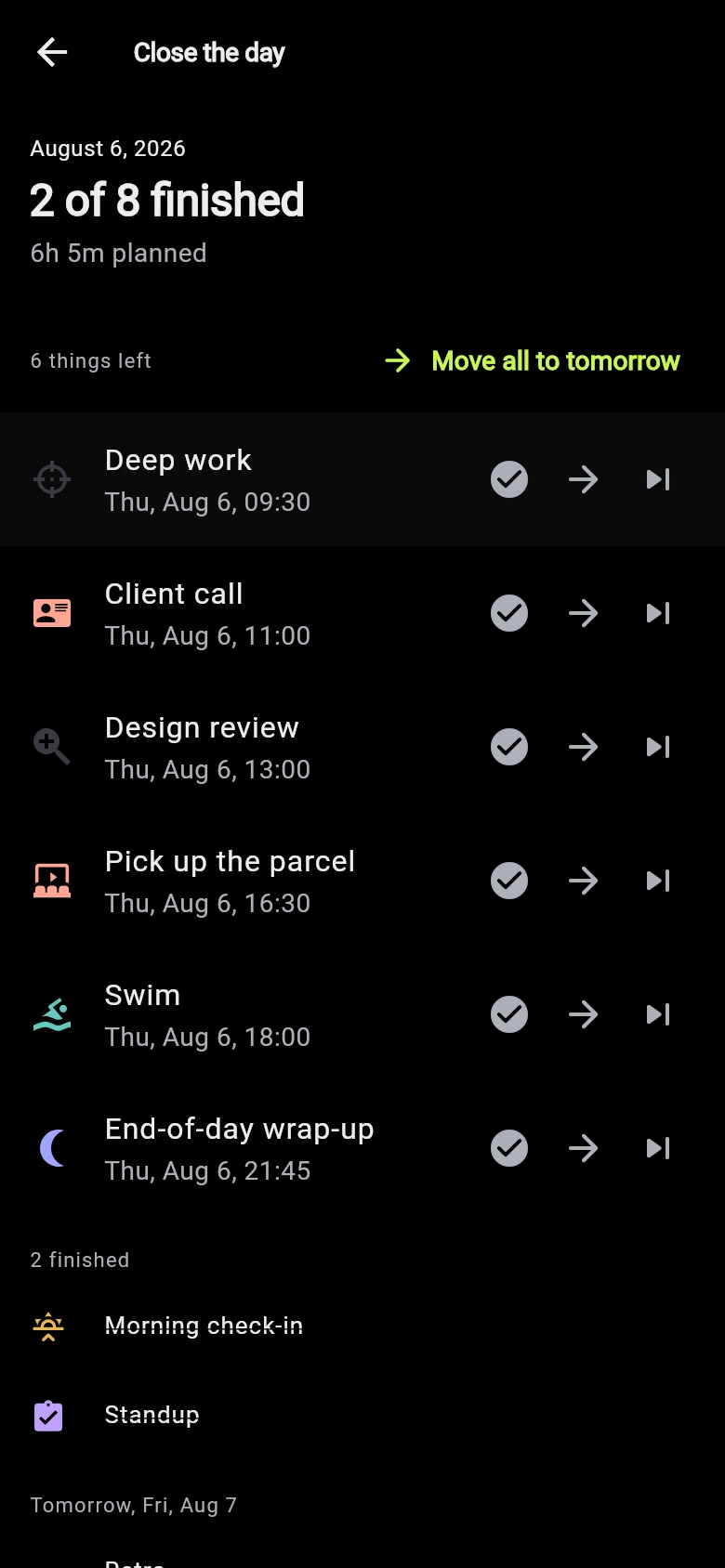
At the end of the day: what finished, what did not, and where the rest goes. Move the leftovers to tomorrow one at a time or all at once, or say plainly that something is not happening — then look at tomorrow before you close the app.
Statistics that stay on the device
What your plans actually turned into: how much finished, day by day, days finished in a row, where the time went, when in the day you finish things, and how honest your estimates were. Counted here, from your own days, and sent nowhere.
Saved days, saved activities
Save a day you liked and stamp it onto any other date, or keep a single activity as a template and drop it into the inbox. A week that repeats is set up once.
Two more ways to look at the same items
A priority matrix that reads urgency from the dates you already set and importance from the priority you already chose — drag a card to change its priority, never its date. Business mode adds a board of the five states work can be in.
Calendar files in and out
Export a day, a week, a month or everything as a calendar file, or as a page you can print. Read a calendar file back in as read-only events, matched on their own identifiers, in one undoable step. No account, no connector, no sync service.
Projects and billable time
Business mode adds projects and clients: a project groups items, focus time and billing for one piece of work, and a client carries a default hourly rate. One professional, one device — no sharing, no team, no invoicing.
Legible on purpose
A high-contrast theme, a reduce-motion switch that goes further than the system setting, and completed items you can keep on the lane or hide. The timeline is scaled by time, not by importance, at every text size, and every gesture has a button or a screen-reader action beside it.
Search is local and unlogged. On a keyboard, Ctrl+K opens the command palette, Ctrl+Z undoes, and J, L and T walk the days — and every change made this session is listed in the day menu, so you can take the plan back to any point in it.
Privacy
Everything you plan stays on this device
Not a policy written to permit as much as possible — a description of an app that cannot send anything anywhere, because there is nothing in it that makes a request.
No network client
TempoLane has no network client. There is no code in it that talks to a server, so there is nothing that could upload your day.
No account, no identifier
No sign-in, no profile, no device identifier, nothing to create and nothing to lose.
No analytics, no crash reporting, no ads
Nothing is measured, nothing is reported, and no advertising code is bundled.
Computed here
Search and every figure the app puts on screen are worked out on the device.
Links leave only when you tap them
Opening a link, a map or a call hands it to an app you choose, and only when you tap it. Only https, mail, phone, message and map addresses are allowed through.
How it is stored
Everything except the file index is encrypted with XChaCha20-Poly1305. The index holds only sizes, revisions and checksums.
On iOS and Android the key lives in the Keychain or the Keystore. In a browser it lives in browser storage, which is not hardware-backed — the web build is deliberately less protected than the mobile ones, and the app says so on its own privacy screen.
Saves go through a journal, so a write interrupted by a crash or a flat battery is either finished or discarded on the next launch. A small rotation of last-known-good copies is kept in case a file cannot be read at all.
What local-only does not protect against
Local-only is not the same as invulnerable. A rooted or compromised device, an operating-system backup, a screenshot, or a copy you export yourself are all outside what TempoLane can control.
Read the privacy policyFree
Free, and staying that way
There is no paid tier to unlock, no trial to run out and no data to sell — so there is no business model here that needs protecting from you.
If it saves you an afternoon, a tip is welcome. It changes nothing in the app either way.
Quickest Way to Tip
Other ways to say thanks:
Prefer email? Send a tip
Get it
Where TempoLane runs
One app, three platforms, no account on any of them. What is ready today and what is not is spelled out below rather than implied.
Web
Runs in the browser, stored in the browser's own private file system. Reminders are the one thing the web cannot do — the platform will not schedule them, so the fields are hidden rather than shown doing nothing.
Try ItAndroid
In closed testing on Google Play. Join the tester list and it installs like any other app.
iOS
Same as Android: the App Store workflow exists, the first build does not. TempoLane needs no account on iOS either, so nothing changes for you when it does.
TempoLane is still being prepared for release. The web address above goes live with its first deploy; the store builds follow.